
— For services still on QikKids
Spend Less Time Managing Systems. More Time Leading Your Service.
See why childcare providers are moving from QikKids to Xplor Education.
Reduce admin complexity, gain real-time visibility across your operations, and give families and educators a better everyday experience with one integrated childcare management platform.
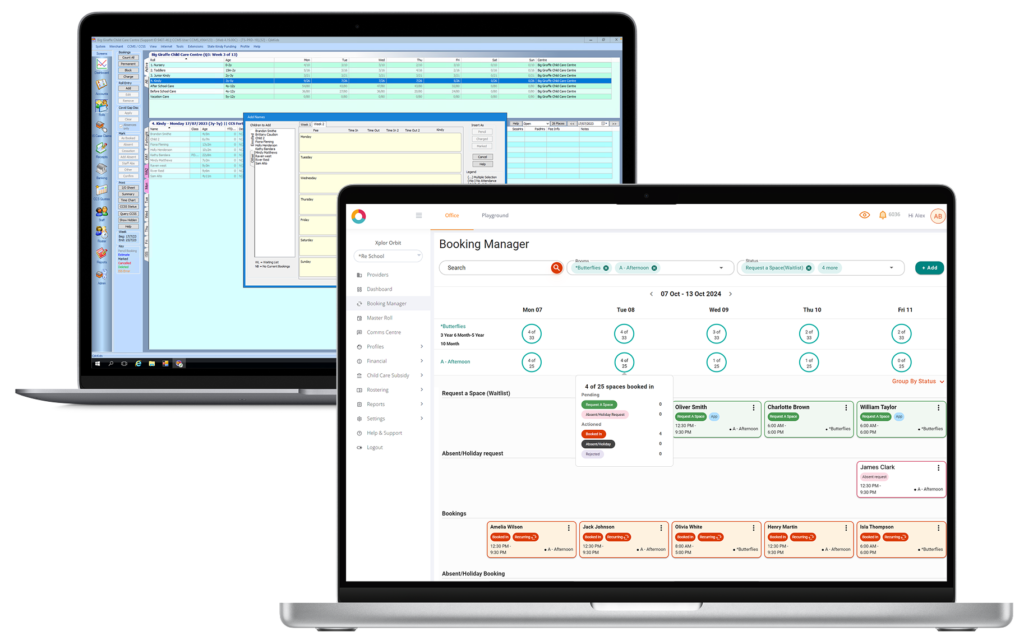
Feature Comparison:
QikKids vs Xplor Ecosystem
| FEatures | QikKids Desktop | Xplor ECOSYSTEM |
|---|---|---|
| Access to Products and Features | • You can only access features and products via Windows • You need separate logins for each product (i.e., Kiosk, Enrol, My Family Lounge) | • Log in to Office from anywhere using any device—PC or laptop (both Windows and Mac) • Playground and Home can be used on a computer, laptop, tablet or smartphone to access data and features • Home, Playground and Office are all integrated in Xplor’s ecosystem • No need to use multiple apps; no more double handling of your data |
| Enrolment | • You can customise enrolment forms in QK Enrol and add required fields | • Customisable enrolment forms • You can add required fields to the form • Set mandatory documentation submission (e.g. immunisation records) • Automatic integration, automated enquiry handling and waitlist management |
| Payment Options | • Auto-charge via Debit Success • Uploading and viewing receipts on Debit Success • Weekly charge your rolls and upload payments to the gateway | • Flexible payment options for parents—accept credit card and direct debit payments • Automatic reconciliation, processing post subsidy, recurring payments • Mobile, ad hoc solutions • Scheduled payment options • Fully automated payment gateway removes the need to charge and upload your payments • Live parent statements via the Home app |
| CCS Submissions | • CCS Attendances, ACCS and ISS management • Over ten steps to complete CCS submissions and process ISS | • Automatic CCS submissions, reminders and government messages |
| Parent Communication | • Your centre can reach out to parents via QK Kiosk | • The Communications Centre allows you to message parents through multiple channels • You can send messages via the Home parent app, email, the hub or SMS • Direct educator-parent communication with Messenger |
| Customer Support | • You can contact support via phone and email • Support is available from 8 am – 5 pm AEST | • You can consult with a representative through phone, email and live chat • Support is available for extended hours, from 8 am - 6 pm AEDT |
NO PRESSURE. NO PIPELINE.
You don't need to have made a decision.
A conversation with our team isn't a commitment to switch. It's an opportunity to see what's changed, ask the questions you have and get a clearer picture of what migration would actually look like for your service specifically.